Learn how to select, configure, and prepare orations for a liturgy using the Source & Summit Digital Platform.
The features described in this article apply to the following plans:
Standard Plan
Educational Plan
Complete Digital Add-On
Note: Orations are not supported with the Basic Digital Add-On Plan.
What are Orations?
Orations are specific prayers assigned to the Priest at different parts of the liturgy. Also called “presidential prayers”, the priest addresses these prayers to God “in the name of the entire holy people and those present” (Sacrosanctum Concilium, no. 33).
The orations include:
Collect
Prayer over the Offerings
Prayer after Communion
When to include orations in an Ordo
Although the congregation does not recite the orations out loud, the priest offers these prayers on its behalf. You may choose to include the orations in a printed booklet so the congregation can follow along.
Priests can also use the Digital Platform to practice chanting the orations. They can create their own Ordos and use the audio playback feature, or music directors can share a prepared Ordo with them.
Note
To enable audio playback for an oration in a shared Ordo, change its format to Point or Notate before sharing.
Configuring orations
Once you add an Oration section to your Ordo, the right panel will display three configuration options:
Format - Switch between text-only, pointed, or notated view
Intro/conclusion - Add or remove the introductory parts of the prayers and the congregation’s response
Text Display - Switch between Paragraph or In Verse layout for full text display
How to display music for the orations
Add an oration section to your Outline: Collect, Prayer over the Offerings, Prayer after Communion.
Click the oration in the center canvas.
→ Customization settings will open in the right panel.
Under Format, click Point or Notate.
If you select Point:
4. Click Display Tone.
→ A notated tone will appear above the text.
5. Select the Tone: Solemn or Simple.
6. Select Notation: Square or Modern.
7. Click - or + to adjust the key.
If you select Notate:
4. The prayer text will appear fully notated in modern notation.
5. Select Notation: Square or Modern.
6. Click - or + to adjust the key.
Solemn and Simple Tones
Orations in the Digital Platform can be set to two tones:
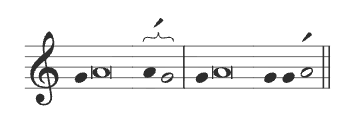
The Solemn Tone is used in the Roman Missal, 3rd Edition, and appears in thy Ordo by default:
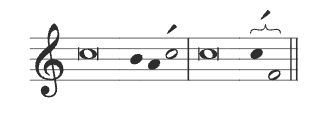
The Simple Tone comes from the former Sacramentary, but is commonly used:
You can change the tone of an oration in the right panel. Click the oration and under Tone, click Solemn or Simple.